Tutorial
The tutorial provides more detail and examples compared to the Getting Started, but not as much detail as may be found in Reference Manual. This guide starts by defining basic concepts and concludes with tips about advanced use cases including batch reads, profiling, and agent-based tuning. These topics include detailed code examples in multiple languages. Please select one of the tabs for your language of choice (e.g. bash, python, etc.) and this preference will be reflected throughout the document.
The GEOPM project consists of a two-tiered software structure: the GEOPM Service and the GEOPM Runtime. The GEOPM Service stands out by offering a secure userspace interface, facilitating access to hardware telemetry and configurations. On the other hand, the GEOPM Runtime empowers end-users to delve deeper into their application profiles for refined data analysis. Additionally, it provides the option to implement active hardware configuration algorithms, paving the way for enhanced energy efficiency.
For in-depth descriptions of these two parts of the GEOPM software see: User Guide for GEOPM Access Service or User Guide for GEOPM Runtime.
🗃️ Platform Topology
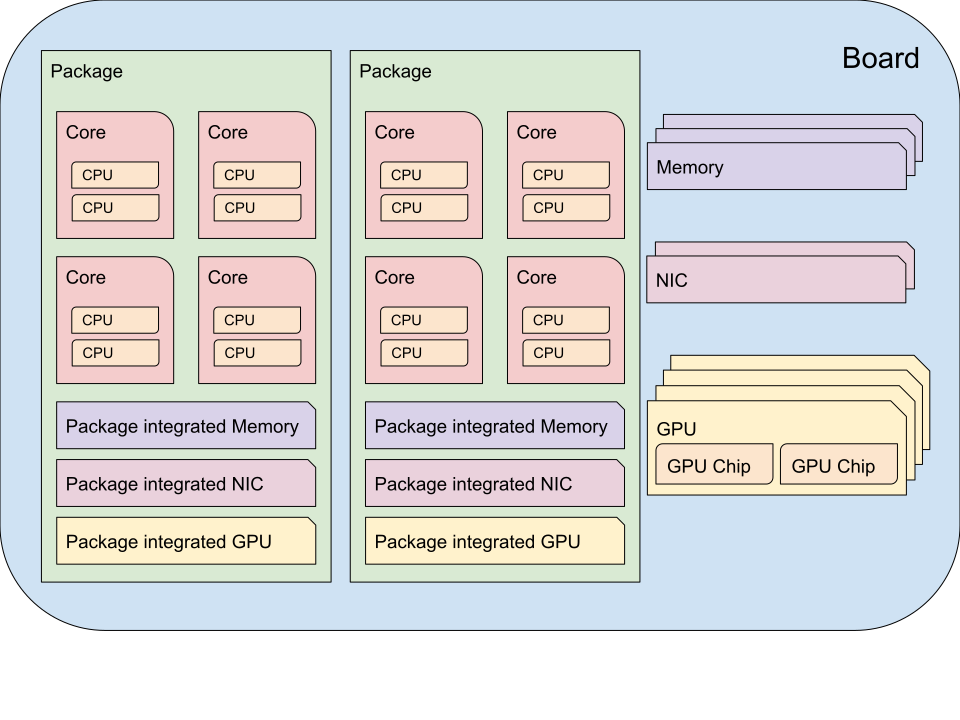
All of the code examples require linking against libgeopmd for C/C++. The
Python examples require that your PYTHONPATH contains the geopmdpy
module and that libgeopmd is available in your LD_LIBRARY_PATH.
The following examples leverage geopmread or
geopmwrite for command-line usage, and the
C, C++, and
Python APIs of PlatformTopo for the platform
topology.
# Print all domains:
$ geopmread --domain
# OR
$ geopmwrite --domain

board                       1
package                     2
core                        104
cpu                         208
memory                      2
package_integrated_memory   2
nic                         0
package_integrated_nic      0
gpu                         6
package_integrated_gpu      0
gpu_chip                    12
// Query the number of physical cores in the system

#include <stdio.h>
#include <geopm_topo.h>

int main (int argc, char** argv)
{
    int num_cores = geopm_topo_num_domain(GEOPM_DOMAIN_CORE);
    printf("Num cores = %d\n", num_cores);

    return 0;
}
// Query the number of physical cores in the system

#include <iostream>
#include <geopm/PlatformTopo.hpp>

int main (int argc, char** argv)
{
    int num_cores = geopm::platform_topo().num_domain(GEOPM_DOMAIN_CORE);
    std::cout << "Num cores = " << num_cores << std::endl;

    return 0;
}
# Query the number of physical cores in the system

import geopmdpy.topo as topo

num_core = topo.num_domain(topo.DOMAIN_CORE)
print(f'Num cores = {num_core}')
// Query the number of physical cores in the system

package main

import (
    "fmt"
    "github.com/geopm/geopmdgo/geopmdgo"
)

func main() {
    numCore, err := geopmdgo.NumDomain("core")
    if err != nil {
        fmt.Println("Error:", err)
        return
    }
    fmt.Printf("Num cores = %d\n", numCore)
}
🔬 Reading Telemetry
We refer to any bit of telemetry that can be read with the Service as a
signal. Each signal has a native domain. For example, the native domain of
the current operating frequency of the CPU (i.e. CPU_FREQUENCY_STATUS or
MSR::PERF_STATUS:FREQ) is the CPU domain. Any signal can be aggregated to
any domain that is more coarse than its native domain; in our example, CPU
frequency can be aggregated to the package or board domains since they are
more coarse than the CPU domain.
The following examples make use of geopmread for the command-line
and the C, C++, and Python APIs for PlatformIO in their respective languages.
Listing All Available Signals
$ geopmread
Listing Signal Information
Note
Some telemetry fields have a “high level” alias that can be used in place
of the “low level” name. In this case, CPU_FREQUENCY_STATUS is an alias
for MSR::PERF_STATUS:FREQ. When using geopmread -i to query for
information about a signal, the native domain and aggregation type are only
listed for the “low level” name. For more information on names, see: Breaking
Down Signal/Control Names.
$ geopmread -i CPU_FREQUENCY_STATUS

CPU_FREQUENCY_STATUS:
    description: The current operating frequency of the CPU.
    iogroup: MSR
    alias_for: MSR::PERF_STATUS:FREQ

$ geopmread -i MSR::PERF_STATUS:FREQ

MSR::PERF_STATUS:FREQ:
    description: The current operating frequency of the CPU.
    units: hertz
    aggregation: average
    domain: cpu
    iogroup: MSRIOGroup
Reading Signals
# Read the current CPU frequency for cpu 0

$ geopmread CPU_FREQUENCY_STATUS cpu 0
// Read the current CPU frequency for cpu 0

#include <limits.h>
#include <stdio.h>
#include <geopm_topo.h>
#include <geopm_pio.h>
#include <geopm_error.h>

int main (int argc, char** argv)
{
    double curr_frequency = 0;
    char err_msg[GEOPM_MESSAGE_MAX];

    int err = geopm_pio_read_signal("CPU_FREQUENCY_STATUS",
                                    GEOPM_DOMAIN_CPU,
                                    0,
                                    &curr_frequency);

    if (err != 0) {
        geopm_error_message(err, err_msg, GEOPM_MESSAGE_MAX);
        printf("Err msg = %s\n", err_msg);
    }
    printf("Current CPU frequency for core 0 = %f\n", curr_frequency);

    return 0;
}
// Read the current CPU frequency for cpu 0

#include <iostream>
#include <geopm/PlatformIO.hpp>
#include <geopm/PlatformTopo.hpp>

int main (int argc, char** argv)
{
    double curr_frequency =
        geopm::platform_io().read_signal("CPU_FREQUENCY_STATUS",
                                         GEOPM_DOMAIN_CPU, 0);

    std::cout << "Current CPU frequency for core 0 = "
              << curr_frequency << std::endl;

    return 0;
}
# Read the current CPU frequency for cpu 0

import geopmdpy.topo as topo
import geopmdpy.pio as pio

curr_frequency = pio.read_signal('CPU_FREQUENCY_STATUS', topo.DOMAIN_CPU, 0)
print(f'Current CPU frequency for core 0 = {curr_frequency}')
// Read the current CPU frequency for cpu 0

package main

import (
    "fmt"
    "github.com/geopm/geopmdgo/geopmdgo"
)

func main() {
    frequency, err := geopmdgo.ReadSignal("CPU_FREQUENCY_STATUS", geopmdgo.DOMAIN_CPU, 0)
    if err != nil {
        fmt.Println("Error:", err)
        return
    }
    fmt.Printf("Current CPU frequency for core 0 = %f\n", frequency)
}
Understanding Aggregation
The telemetry that is output from geopmread or the APIs will automatically
be aggregated based on the requested domain and the aggregation
type.
Using CPU_FREQUENCY_STATUS as an example, the output in Listing Signal
Information shows the native domain as cpu and the aggregation type as
average. Notice the topology diagram shows that CPUs
are contained within cores, cores within packages, and packages within the board.
When a CPU_FREQUENCY_STATUS request is made at the core domain, GEOPM
reads and averages the frequencies of all CPUs linked to that core. If the
request is at the package domain, it aggregates the frequencies of all CPUs
across every core in that package and provides the average. This methodology
escalates up to the broadest domain, the board domain. Thus, to obtain the
average frequency spanning all packages, cores, and CPUs in the system, one
would issue a geopmread at the board domain.
On the other hand, using CPU_ENERGY as an example, the output in Listing
Signal Information shows the native domain as cpu and the aggregation
type as sum. When a CPU_ENERGY request is made at the core domain,
GEOPM sums the energy consumed by all CPUs linked to that core. If the request
is at the package domain, it sums the energy consumed by all CPUs across
every core in that package and provides the total. This methodology escalates up
to the broadest domain, the board domain. Thus, to obtain the total energy
consumed by all packages, cores, and CPUs in the system, one would issue a
geopmread at the board domain.
For more information about aggregation types, see: geopm::Agg(3) – data aggregation functions.
Video Demo: Using geopmread
Reading Multiple Signals
To fetch platform telemetry and output it to the console or a file:
From the command-line: Use geopmsession. Its input arguments are similar to geopmread, but are taken from standard input rather than the command-line.
From code: Utilize the batch read API.
$ echo -e 'TIME board 0\nCPU_FREQUENCY_STATUS package 0' | geopmsession
// Read multiple signals using batch interface

#include <limits.h>
#include <stdio.h>
#include <geopm_topo.h>
#include <geopm_pio.h>
#include <geopm_error.h>

int read_signals ()
{
    int time_idx, freq_idx, err;
    double time_value, freq_value;

    time_idx = geopm_pio_push_signal("TIME", GEOPM_DOMAIN_BOARD, 0);
    if (time_idx < 0) {
        // geopm_pio_push_signal will return a negative value when something went wrong
        return time_idx;
    }
    freq_idx = geopm_pio_push_signal("CPU_FREQUENCY_STATUS", GEOPM_DOMAIN_PACKAGE, 0);
    if (freq_idx < 0) {
        return freq_idx;
    }
    err = geopm_pio_read_batch();
    if (err < 0) {
        return err;
    }
    err = geopm_pio_sample(time_idx, &time_value);
    if (err < 0) {
        return err;
    }
    err = geopm_pio_sample(freq_idx, &freq_value);
    if (err < 0) {
        return err;
    }
    printf("Elapsed time = %f\n", time_value);
    printf("Current CPU frequency for core 0 = %f\n", freq_value);

    return 0;
}

int main (int argc, char** argv)
{
    char err_msg[GEOPM_MESSAGE_MAX];
    int err = read_signals();
    if (err < 0) {
        geopm_error_message(err, err_msg, GEOPM_MESSAGE_MAX);
        fprintf(stderr, "Err msg = %s\n", err_msg);
    }

    return 0;
}
// Read multiple signals using batch interface

#include <limits.h>
#include <iostream>
#include <geopm/PlatformIO.hpp>
#include <geopm/PlatformTopo.hpp>

int main (int argc, char** argv)
{
    geopm::PlatformIO &pio = geopm::platform_io();

    int time_idx, freq_idx;
    double time_value, freq_value;

    time_idx = pio.push_signal("TIME", GEOPM_DOMAIN_BOARD, 0);
    freq_idx = pio.push_signal("CPU_FREQUENCY_STATUS", GEOPM_DOMAIN_PACKAGE, 0);

    pio.read_batch();

    time_value = pio.sample(time_idx);
    freq_value = pio.sample(freq_idx);

    std::cout << "Elapsed time = "
              << time_value << std::endl;
    std::cout << "Current CPU frequency for core 0 = "
              << freq_value << std::endl;

    return 0;
}
# Read multiple signals using batch read

import geopmdpy.topo as topo
import geopmdpy.pio as pio

time_idx = pio.push_signal('TIME', topo.DOMAIN_BOARD, 0)
freq_idx = pio.push_signal('CPU_FREQUENCY_STATUS', topo.DOMAIN_PACKAGE, 0)

pio.read_batch()
print(f"Elapsed time = {pio.sample(time_idx)}")
print(f"Current CPU frequency for core 0 = {pio.sample(freq_idx)}")
// Read multiple signals using batch read

package main

import (
    "fmt"
    "github.com/geopm/geopmdgo/geopmdgo"
)

func main() {
    timeIdx, err := geopmdgo.PushSignal("TIME", geopmdgo.DOMAIN_BOARD, 0)
    if err != nil {
        fmt.Println("Error:", err)
        return
    }
    freqIdx, err := geopmdgo.PushSignal("CPU_FREQUENCY_STATUS", geopmdgo.DOMAIN_PACKAGE, 0)
    if err != nil {
        fmt.Println("Error:", err)
        return
    }
    err = geopmdgo.ReadBatch()
    if err != nil {
        fmt.Println("Error:", err)
        return
    }
    time, err := geopmdgo.Sample(timeIdx)
    if err != nil {
        fmt.Println("Error:", err)
        return
    }
    frequency, err := geopmdgo.Sample(freqIdx)
    if err != nil {
        fmt.Println("Error:", err)
        return
    }
    fmt.Printf("Elapsed time = %f\n", time)
    fmt.Printf("Current CPU frequency for core 0 = %f\n", frequency)
}
For more information on geopmsession see: geopmsession(1) – sample platform information over time.
Capturing Telemetry Over Time
geopmsession can also capture data over time with the -p and -t
options. This behavior is easily implemented in code along with the batch read
interface.
# Read 2 signals for 10 seconds, sampling once a second:

$ echo -e 'TIME board 0\nCPU_FREQUENCY_STATUS package 0' | geopmsession -p 1.0 -t 10.0
// Read multiple signals for 10 seconds using batch read, sampling once a second

#include <limits.h>
#include <stdio.h>
#include <unistd.h>
#include <geopm_topo.h>
#include <geopm_pio.h>
#include <geopm_error.h>

int read_signals ()
{
    int time_idx, freq_idx, err;
    double time_value, freq_value;
    int ii;

    time_idx = geopm_pio_push_signal("TIME", GEOPM_DOMAIN_BOARD, 0);
    if (time_idx < 0) {
        // geopm_pio_push_signal will return a negative value when something went wrong
        return time_idx;
    }
    freq_idx = geopm_pio_push_signal("CPU_FREQUENCY_STATUS", GEOPM_DOMAIN_PACKAGE, 0);
    if (freq_idx < 0) {
        return freq_idx;
    }
    printf("time,frequency\n");
    for (ii = 0; ii < 10; ii++) {
        err = geopm_pio_read_batch();
        if (err < 0) {
            return err;
        }
        err = geopm_pio_sample(time_idx, &time_value);
        if (err < 0) {
            return err;
        }
        err = geopm_pio_sample(freq_idx, &freq_value);
        if (err < 0) {
            return err;
        }
        printf("%f,%f\n", time_value, freq_value);
        sleep(1);
    }

    return 0;
}

int main (int argc, char** argv)
{
    char err_msg[GEOPM_MESSAGE_MAX];
    int err = read_signals();
    if (err < 0) {
        geopm_error_message(err, err_msg, GEOPM_MESSAGE_MAX);
        fprintf(stderr, "Err msg = %s\n", err_msg);
    }

    return 0;
}
// Read multiple signals for ten seconds using batch read every second

#include <limits.h>
#include <unistd.h>
#include <iostream>
#include <geopm/PlatformIO.hpp>
#include <geopm/PlatformTopo.hpp>

int main (int argc, char** argv)
{
    geopm::PlatformIO &pio = geopm::platform_io();

    int time_idx, freq_idx;
    double time_value, freq_value;

    time_idx = pio.push_signal("TIME",
                               GEOPM_DOMAIN_BOARD,
                               0);

    freq_idx = pio.push_signal("CPU_FREQUENCY_STATUS",
                               GEOPM_DOMAIN_PACKAGE,
                               0);

    std::cout << "time,frequency" << std::endl;
    for (int ii = 0; ii < 10; ii++) {
        pio.read_batch();

        time_value = pio.sample(time_idx);
        freq_value = pio.sample(freq_idx);

        std::cout << time_value << "," << freq_value << std::endl;
        sleep(1);
    }

    return 0;
}
# Read multiple signals for ten seconds using batch read every second

import geopmdpy.topo as topo
import geopmdpy.pio as pio
import time

time_idx = pio.push_signal('TIME', topo.DOMAIN_BOARD, 0)
freq_idx = pio.push_signal('CPU_FREQUENCY_STATUS', topo.DOMAIN_PACKAGE, 0)

print("time,frequency")
for ii in range(10):
    pio.read_batch()
    print(f"{pio.sample(time_idx)},{pio.sample(freq_idx)}")
    time.sleep(1)
// Read multiple signals for ten seconds using batch read every second

package main

import (
    "fmt"
    "time"
    "github.com/geopm/geopmdgo/geopmdgo"
)

func main() {
    timeIdx, err := geopmdgo.PushSignal("TIME", geopmdgo.DOMAIN_BOARD, 0)
    if err != nil {
        fmt.Println("Error:", err)
        return
    }
    freqIdx, err := geopmdgo.PushSignal("CPU_FREQUENCY_STATUS", geopmdgo.DOMAIN_PACKAGE, 0)
    if err != nil {
        fmt.Println("Error:", err)
        return
    }
    fmt.Println("time,frequency")
    for i := 0; i < 10; i++ {
        time.Sleep(1 * time.Second)
        err = geopmdgo.ReadBatch()
        if err != nil {
            fmt.Println("Error:", err)
            return
        }
        time, err := geopmdgo.Sample(timeIdx)
        if err != nil {
            fmt.Println("Error:", err)
            return
        }
        frequency, err := geopmdgo.Sample(freqIdx)
        if err != nil {
            fmt.Println("Error:", err)
            return
        }
        fmt.Printf("%f,%f\n", time, frequency)
    }
}
Again, for more information on geopmsession see geopmsession(1) – sample platform information over time.
Video Demo: Using geopmsession
⚙️ Enact Hardware-based Settings
We refer to any hardware setting that can be manipulated through the Service as
a control. Like signals, each control has a native domain. Any control can
be disaggregated from a coarse domain (e.g., board) to its native domain.
See Understanding Disaggregation for more information.
The following examples make use of geopmwrite for the
command-line and the C,
C++, and Python
APIs for PlatformIO to enact hardware controls in their respective
languages.
Listing All Available Controls
$ geopmwrite
Listing Control Information
$ geopmwrite -i CPU_FREQUENCY_MAX_CONTROL

CPU_FREQUENCY_MAX_CONTROL:
Target operating frequency of the CPU based on the control register.

# To include the aggregation type, use geopmread:

$ geopmread -i CPU_FREQUENCY_MAX_CONTROL

CPU_FREQUENCY_MAX_CONTROL:
    description: Target operating frequency of the CPU based on the control register. Note: when querying at a higher domain, if NaN is returned, query at its native domain.
    alias_for: MSR::PERF_CTL:FREQ
    units: hertz
    aggregation: expect_same
    domain: core
    iogroup: MSRIOGroup
Writing Controls
# Write the current CPU frequency for core 0 to 3.0 GHz

$ geopmwrite CPU_FREQUENCY_MAX_CONTROL core 0 3.0e9
// Write the current CPU frequency for core 0 to 3.0 GHz

#include <limits.h>
#include <stdio.h>
#include <geopm_topo.h>
#include <geopm_pio.h>
#include <geopm_error.h>

int main (int argc, char** argv)
{
    char err_msg[GEOPM_MESSAGE_MAX];

    int err = geopm_pio_write_control("CPU_FREQUENCY_MAX_CONTROL",
                                      GEOPM_DOMAIN_CORE,
                                      0,
                                      3.0e9);

    if (err != 0) {
        geopm_error_message(err, err_msg, GEOPM_MESSAGE_MAX);
        printf("Err msg = %s\n", err_msg);
    }

    return 0;
}
// Write the current CPU frequency for core 0 to 3.0 GHz

#include <iostream>
#include <geopm/PlatformIO.hpp>
#include <geopm/PlatformTopo.hpp>

int main (int argc, char** argv)
{
    geopm::platform_io().write_control("CPU_FREQUENCY_MAX_CONTROL",
                                       GEOPM_DOMAIN_CORE, 0,
                                       3.0e9);

    return 0;
}
# Write the current CPU frequency for core 0 to 3.0 GHz

import geopmdpy.topo as topo
import geopmdpy.pio as pio

pio.write_control('CPU_FREQUENCY_MAX_CONTROL', topo.DOMAIN_CORE, 0, 3.0e9)
// Write the current CPU frequency for core 0 to 3.0 GHz

package main

import (
    "github.com/geopm/geopmdgo/geopmdgo"
)

func main() {
    err := geopmdgo.WriteControl("CPU_FREQUENCY_MAX_CONTROL", geopmdgo.DOMAIN_CORE, 0, 3.0e9)
    if err != nil {
        fmt.Println("Error:", err)
    }
}
Note
To determine the initial value of any control, use geopmread or the
corresponding PlatformIO APIs at the desired domain. E.g.:
$ geopmread CPU_FREQUENCY_MAX_CONTROL core 0
Writing Multiple Controls
# Write the core 0 frequency to 1 GHz and core 1 frequency to 1.8 GHz

$ echo -e "CPU_FREQUENCY_MAX_CONTROL core 0 1e9\
           \nCPU_CORE_FREQUENCY_MAX_CONTROL core 0 1.8e9"\
           | geopmwrite -f -
// Write the core 0 frequency to 1 GHz and core 1 frequency to 1.8 GHz

#include <limits.h>
#include <stdio.h>
#include <geopm_topo.h>
#include <geopm_pio.h>
#include <geopm_error.h>

int main (int argc, char** argv)
{
    char err_msg[GEOPM_MESSAGE_MAX];
    int ctl0_idx;
    int ctl1_idx;
    int err;

    // Push controls for each core
    ctl0_idx = geopm_pio_push_control("CPU_FREQUENCY_MAX_CONTROL", GEOPM_DOMAIN_CORE, 0);
    ctl1_idx = geopm_pio_push_control("CPU_FREQUENCY_MAX_CONTROL", GEOPM_DOMAIN_CORE, 1);

    // Adjust the controls to the target frequencies
    err = geopm_pio_adjust(ctl0_idx, 1.0e9);
    if (err != 0) {
        geopm_error_message(err, err_msg, GEOPM_MESSAGE_MAX);
        printf("Error adjusting core 0: %s\n", err_msg);
    }
    err = geopm_pio_adjust(ctl1_idx, 1.8e9);
    if (err != 0) {
        geopm_error_message(err, err_msg, GEOPM_MESSAGE_MAX);
        printf("Error adjusting core 1: %s\n", err_msg);
    }

    // Write the batch of controls
    err = geopm_pio_write_batch();
    if (err != 0) {
        geopm_error_message(err, err_msg, GEOPM_MESSAGE_MAX);
        printf("Error writing batch: %s\n", err_msg);
    }

    return 0;
}
// Write the core 0 frequency to 1 GHz and core 1 frequency to 1.8 GHz

#include <iostream>
#include <geopm/PlatformIO.hpp>
#include <geopm/PlatformTopo.hpp>

int main (int argc, char** argv)
{
    geopm::PlatformIO &pio = geopm::platform_io();

    // Push controls for each core
    int ctl0_idx = pio.push_control("CPU_FREQUENCY_MAX_CONTROL", GEOPM_DOMAIN_CORE, 0);
    int ctl1_idx = pio.push_control("CPU_FREQUENCY_MAX_CONTROL", GEOPM_DOMAIN_CORE, 1);

    // Adjust the controls to the target frequencies
    pio.adjust(ctl0_idx, 1.0e9);
    pio.adjust(ctl1_idx, 1.8e9);

    // Write the batch of controls
    pio.write_batch();

    return 0;
}
# Write the core 0 frequency to 1 GHz and core 1 frequency to 1.8 GHz

import geopmdpy.topo as topo
import geopmdpy.pio as pio

# Define target frequencies for each core
freqs = [1.0e9, 1.8e9]
ctl_idxs = []

# Push controls for each core
ctl_idxs.append(pio.push_control('CPU_FREQUENCY_MAX_CONTROL', topo.DOMAIN_CORE, 0))
ctl_idxs.append(pio.push_control('CPU_FREQUENCY_MAX_CONTROL', topo.DOMAIN_CORE, 1))

# Adjust the controls to the target frequencies
for idx, ctl in enumerate(ctl_idxs):
    pio.adjust(ctl, freqs[idx])

# Write the batch of controls
pio.write_batch()
// Write the core 0 frequency to 1 GHz and core 1 frequency to 1.8 GHz

package main

import (
    "fmt"
    "github.com/geopm/geopmdgo/geopmdgo"
)

func main() {
    // Push controls for each core
    ctl0Idx, err := geopmdgo.PushControl("CPU_FREQUENCY_MAX_CONTROL", geopmdgo.DOMAIN_CORE, 0)
    if err != nil {
        fmt.Println("Error pushing control for core 0:", err)
        return
    }
    ctl1Idx, err := geopmdgo.PushControl("CPU_FREQUENCY_MAX_CONTROL", geopmdgo.DOMAIN_CORE, 1)
    if err != nil {
        fmt.Println("Error pushing control for core 1:", err)
        return
    }

    // Adjust the controls to the target frequencies
    err = geopmdgo.Adjust(ctl0Idx, 1.0e9)
    if err != nil {
        fmt.Println("Error adjusting core 0:", err)
        return
    }
    err = geopmdgo.Adjust(ctl1Idx, 1.8e9)
    if err != nil {
        fmt.Println("Error adjusting core 1:", err)
        return
    }

    // Write the batch of controls
    err = geopmdgo.WriteBatch()
    if err != nil {
        fmt.Println("Error writing batch:", err)
        return
    }
}
Note
To determine the initial value of any control, use geopmread or the
corresponding PlatformIO APIs at the desired domain. E.g.:
$ geopmread CPU_FREQUENCY_MAX_CONTROL core 0
Understanding Disaggregation
Just as signals can be aggregated to a more coarse domain from their native
one, controls can be disaggregated from a coarse domain to their native domain.
This happens automatically with geopmwrite and the corresponding APIs.
Using CPU_FREQUENCY_MAX_CONTROL as an example, the output in Listing Control
Information shows the native domain as core. To
write the same value to all the cores in a package, simply issue the request at
the package domain, and the CPU_FREQUENCY_MAX_CONTROL of all cores in
that package will be written. Likewise, to write the same value to all cores
in all packages, issue the request at the board domain.
To understand the method of disaggregation for a specific control, you must examine its aggregation type.
For instance, CPU_FREQUENCY_MAX_CONTROL has an aggregation type labeled
expect_same. When setting this control at a domain level coarser than its
native domain, all native domains inherit the same value as the coarser domain.
This consistent distribution applies to all aggregation types, with the
exception of sum; controls that use sum aggregation will have the
requested value distributed evenly across the native domain. Taking
MSR::PKG_POWER_LIMIT:PL1_POWER_LIMIT as an example, it has the following
information:
$ geopmread -i MSR::PKG_POWER_LIMIT:PL1_POWER_LIMIT

MSR::PKG_POWER_LIMIT:PL1_POWER_LIMIT:
    description: The average power usage limit over the time window specified in PL1_TIME_WINDOW.
    units: watts
    aggregation: sum
    domain: package
    iogroup: MSRIOGroup
Since the package domain is contained within the board domain, writing this
control at the board domain will evenly distribute the requested value over
all the packages in the system. This means that requesting a 200 W power limit
at the board domain will result in each package receiving a limit of
100 W.
Video Demo: Using geopmwrite
🎯 Optimize Control Settings
Reading telemetry and writing controls by hand answers the question “what does
this setting do?” The geopmopt tool answers the follow-up
question “which settings are best for my application?” automatically. It uses
Bayesian optimization to search a grid of GEOPM controls: for each trial it
applies a candidate configuration to a scoped session (auto-reverted like every
other control change), runs your application, scores an objective derived from
the application’s output or from measured hardware signals, and uses the result
to choose the next configuration to try. When the search finishes it prints the
best configuration in geopmwrite format so you can apply or save it.
geopmopt builds on the optional optimize dependencies
(scikit-optimize and pyyaml), which are not pulled in by a base
geopmdpy install or by the OS packages. Install geopmdpy with the
optimize extra, ideally into a personal virtual environment as described in
Installing client tools with pip:
$ python3 -m pip install 'geopmdpy[optimize]'
Inspecting the Search Space
Before optimizing, list the controls that can be swept and, for signal-based objectives, the metrics that can be measured:
# Controls available as --sweep dimensions, with their detected ranges
$ geopmopt --list-controls

# Reserved metrics plus any signals referenced by --metric
$ geopmopt --list-metrics --metric power=signal:CPU_POWER@board:mean
Each --sweep dimension uses the CONTROL[@DOMAIN][=MIN:MAX:STEP] grammar
shared with geopmgrid, so cpu-freq@board sweeps the CPU
frequency cap over the whole board and cpu-freq@board=1.2GHz:3GHz:100MHz
narrows the range explored.
Minimizing Runtime
The simplest run sweeps a single control and optimizes wall-clock runtime. With
no --metric-regex the objective is the launch command’s total runtime, so
the application does not need to print anything:
$ echo '{"loop-count": 300,"region": ["dgemm"],"big-o": [0.1]}' > geopmbench.conf
$ geopmopt --verbosity=2 \
           --sweep cpu-freq@board \
           --trials 30 \
           -- geopmbench geopmbench.conf
...
INFO: Optimization completed!
INFO: Best metric: 45.81
Best configuration:
CPU_FREQUENCY_MAX_CONTROL board 0 2800000000.0
Higher --trials counts explore more configurations at the cost of more
application runs; start with 20-30 to validate the setup.
Tuning Several Controls and Saving the Result
Pass --sweep more than once to tune several controls jointly, and use
--output-file to save the winning configuration for reuse:
$ geopmopt --sweep cpu-freq@board \
           --sweep uncore-freq@board \
           --sweep cpu-power@board \
           --trials 30 \
           --output-file best_config.txt \
           -- geopmbench geopmbench.conf

# Apply the saved configuration to the current session later
$ geopmwrite -f best_config.txt
Because the configuration is plain geopmwrite text, it can also be applied
through geopmlaunch --geopm-init-control for a whole job.
Optimizing an Application Figure of Merit
When the application prints a figure of merit, scrape it with a capturing
regular expression. The scraped value is maximized by default; add
--minimize for a quantity that should be smaller, such as a reported time:
# Maximize a throughput the application prints
$ geopmopt --sweep cpu-freq@board --sweep uncore-freq@board \
           --metric-regex 'GFLOPS: ([0-9.]+)' \
           --trials 30 \
           -- ./dgemm_bench.sh

# Minimize a runtime the application prints
$ geopmopt --sweep cpu-freq@package \
           --metric-regex 'Runtime: ([0-9.]+) seconds' \
           --minimize \
           --trials 40 \
           -- ./timed_benchmark
Optimizing for Energy and Efficiency
Add --efficiency DOMAIN to bring measured power into the objective from a
geopmsession energy trace. With a --metric-regex the objective becomes
the figure of merit per watt; with no regex it becomes total energy over the
domain:
# Maximize performance per watt over the cpu domain
$ geopmopt --sweep cpu-freq@board --sweep uncore-freq@board \
           --metric-regex 'Throughput: ([0-9.]+)' \
           --efficiency cpu \
           --trials 30 \
           -- ./throughput_app

# Minimize total cpu energy (no figure of merit needed)
$ geopmopt --sweep cpu-freq@package --sweep uncore-freq@package \
           --efficiency cpu \
           --trials 40 \
           -- ./compute_kernel
Composing Objectives with Constraints
For finer control, the general objective interface names any number of metrics,
selects one to optimize with --maximize/--minimize NAME, and adds
feasibility --constraint bounds. Metrics come from three providers:
regex: (scraped from stdout), signal: (a GEOPM signal sampled with
geopmsession), and expr: (arithmetic over previously named metrics).
This maximizes a scraped figure of merit while holding measured CPU power and
energy within bounds:
$ geopmopt --sweep cpu-freq@board --sweep cpu-power@board \
           --metric fom=regex:'GFLOPS: ([0-9.]+)' \
           --metric power=signal:CPU_POWER@board:mean \
           --metric energy=signal:CPU_ENERGY@board:delta \
           --maximize fom \
           --constraint 'power <= 250W' \
           --constraint 'energy <= 5000J' \
           -- ./app
Configurations that violate a constraint are treated as infeasible, and the best
feasible configuration is reported. Use --list-metrics to confirm a signal
is available and how it will be aggregated before committing to a long run. The
full option list, provider grammar, and legacy-flag equivalences are documented
in geopmopt(1).
📏 Measure Performance
The GEOPM Runtime offers capabilities for collecting telemetry throughout an application’s execution. If you want to measure a particular segment of an application, you can annotate the application code using GEOPM markup.
To integrate the Runtime with an application, you have two options:
geopmlaunch: Ideal for MPI-enabled applications. Simply launch the application using this method.
Manual Setup: This involves configuring the necessary environment settings and directly invoking geopmctl.
geopmlaunch will bring up the Runtime alongside your application using one
of three launch methods: process, pthread, or application. The
process launch method will attempt to launch the main entity of the
Runtime, the Controller, as an extra rank in the MPI gang. The application
launch method (default when unspecified) will launch the Controller as a
separate application (useful for non-MPI applications). For more information,
see the --geopm-ctl option description.
Using geopmlaunch with MPI Applications
# Run with 1 OpenMP thread per rank, and 2 ranks

# SLURM example

$ OMP_NUM_THREADS=1 geopmlaunch srun -N 1 -n 2 --geopm-preload -- ./mpi_application

# PALS example

$ OMP_NUM_THREADS=1 geopmlaunch pals -ppn 2 -n 2 --geopm-preload -- ./mpi_application
When the run has concluded, there will be an output file from the Runtime
called geopm.report in the current working directory. This report file
contains a summary of hardware telemetry over the course of the run.
Time-series data is also available through the use of the --geopm-trace
option to geopmlaunch. For more information about geompmlaunch see:
geopmlaunch(1) – application launch wrapper. For more information about the reports, see:
geopm_report(7) – GEOPM summary report file.
Profiling Applications without geopmlaunch
The geopmlaunch(1) command may not be best suited for your needs if you are
running a non-MPI application, or if you are running an MPI application but the
launch command is embedded in scripts that are difficult to modify. Instead of
using geopmlaunch(1), the user may use the geopmctl(1) application in
conjunction with environment variables that control the GEOPM Runtime behavior.
In this simple example we run the sleep(1) command for 10 seconds and
monitor the system during its execution. Rather than using the geopmlaunch
tool as in the above example, we will run the geopmctl command in the
background while the application of interest is executing. The geopmctl MPI
application should be launched with one process per compute node when executing
the runtime on multiple nodes. There are five requirements to enable the GEOPM
controller process to connect to the application process and generate a report:
Both the
geopmctlprocess and the application process must have theGEOPM_PROFILEenvironment variable set to the same value or both environments may leave this variable unset.The application process must have
LD_PRELOAD=libgeopm.so.2set in the environment or the application binary must be linked directly tolibgeopm.so.2at compile time.The
GEOPM_REPORTenvironment variable must be set in the environment of thegeopmctlprocess.The
GEOPM_PROGRAM_FILTERenvironment variable is required and explicitly lists the program invocation names of any process to be profiled. All other programs will not be affected byLD_PRELOADoflibgeopm.so. For this reason a user will typically set these two environment variables together. This is especially important when profiling programs within a bash script.The
GEOPM_NUM_PROCESSvariable must be set in thegeopmctlenvironment if there is more than one process to be tracked on each compute node.
In addition to generating a report in YAML format, the example below showcases two optional features of the GEOPM Runtime:
CSV Trace File: By setting the
GEOPM_TRACEenvironment variable, you can generate a trace file in CSV format.Sampling Period Adjustment: The
GEOPM_PERIODenvironment variable allows you to modify the controller’s sampling period. For instance, setting it to 200 milliseconds, up from the default 5 milliseconds, results in approximately 50 rows of samples in the trace file (calculated as five samples per second over ten seconds).Disable Network Use The
GEOPM_CTL_LOCALenvironment variable may be set which disables all intra-node communication between the controllers on each node, thereby generating a unique report file per host node over which the application processes are launched.
These three options together will inform the GEOPM runtime controller
(geopmctl) to profile the sleep utility and generate a CSV trace file
with approximately 50 rows of samples (five per-second for ten seconds). In the
provided example, the awk command extracts specific columns: time since
application start (column 1), CPU energy (column 6), and CPU power (column 8).
$ GEOPM_PROFILE=sleep-ten \
  GEOPM_REPORT=sleep-ten.yaml \
  GEOPM_CTL_LOCAL=true \
  GEOPM_TRACE=sleep-ten.csv \
  GEOPM_PERIOD=0.2 \
  geopmctl &
$ GEOPM_PROFILE=sleep-ten \
  GEOPM_PROGRAM_FILTER=sleep \
  LD_PRELOAD=libgeopm.so.2 \
  sleep 10
$ cat sleep-ten.yaml-$(hostname)
$ awk -F\| '{print $1, $6, $8}' sleep-ten.csv-$(hostname) | less
For the full listing of the environment variables accepted by the GEOPM runtime, please refer to the GEOPM Environment Variables section of the GEOPM documentation.
Profiling Specific Parts of an Application
The Runtime supports the automatic profiling of various application regions through several methods:
Annotation with GEOPM Profiling APIs
MPI Autodetection via PMPI
OpenMP Autodetection via OMPT
OpenCL Autodetection (WIP)
The GEOPM Profiling API enables users to annotate
specific sections of the target application for profiling. Each section that is
annotated will show up as a separate Region in the report output files from
the runtime. An example app could be annotated as follows:
#include <stdlib.h>
#include <stdio.h>
#include <stdint.h>
#include <mpi.h>
#include <geopm_prof.h>
#include <geopm_hint.h>
int main(int argc, char** argv)
{
MPI_init(&argc, &argv);
// Application setup...
// Create a GEOPM region ID for later tracking
uint64_t region_1, region_2;
geopm_prof_region("interesting_kernel",
GEOPM_REGION_HINT_COMPUTE,
®ion_1);
geopm_prof_region("synchronize_results",
GEOPM_REGION_HINT_NETWORK,
®ion_2);
//Begin execution loop...
for (int ii = 0; ii < iterations; ii++) {
// Marker to capture behavior of all regions
geopm_prof_epoch();
geopm_prof_enter(region_1);
call_interesting_kernel();
geopm_prof_exit(region_1);
geopm_prof_enter(region_2);
call_synchronize_results();
geopm_prof_exit(region_2);
}
MPI_Finalize();
return 0;
}
For more examples on how to profile applications, see the tutorials section of our GitHub repository.
⚗️ Advanced Topics
Breaking Down Signal/Control Names
Signal and control names in GEOPM are categorized into two types: low-level and high-level.
Low-Level Names: These are prefixed with the IOGroup name followed by two colons. For instance,
MSR::PERF_CTL:FREQis a low-level name.High-Level Names (Aliases): These are user-friendly alternatives to commonly used or multi-IOGroup-supported names. For example:
Alias
CPU_FREQUENCY_STATUScorresponds toMSR::PERF_STATUS_FREQ.Alias
CPU_FREQUENCY_MAX_CONTROLis linked toMSR::PERF_CTL_FREQ.
When using geopmread or geopmwrite to display available signals and
controls, aliases are presented first. These command-line tools also help
decipher what each alias represents. For instance:
$ geopmread -i CPU_FREQUENCY_STATUS

CPU_FREQUENCY_STATUS:
    description: The current operating frequency of the CPU.
    iogroup: MSR
    alias_for: MSR::PERF_STATUS:FREQ
For more information about the currently supported aliases and IOGroups, see: Aliasing Signals And Controls.
Nuances in Setting CPU Frequency
GEOPM supports multiple interfaces to manipulate frequency and there are nuanced interactions with OS drivers. See the User Guide for Frequency Control for full details on how and when to use these interfaces.
Using the Programmable Counters
The programmable counters available on various CPUs can be read with
geopmread from the command-line and through the use of the
InitControl API using the Runtime.
First, determine the event code for your desired performance metric. E.g. for
Skylake Server, the event names and corresponding codes are listed here. The following example
programs the counter to track LONGEST_LAT_CACHE.MISS on CPU 0:
$ export EVENTCODE=0x2E
$ export UMASK=0x41

# Configure which event to monitor, and under which scope
$ geopmwrite MSR::IA32_PERFEVTSEL0:EVENT_SELECT cpu 0 ${EVENTCODE}
$ geopmwrite MSR::IA32_PERFEVTSEL0:UMASK cpu 0 ${UMASK}
$ geopmwrite MSR::IA32_PERFEVTSEL0:USR cpu 0 1   # Enable user scope for events
$ geopmwrite MSR::IA32_PERFEVTSEL0:OS cpu 0 1    # Enable OS scope for events

# Turn on the counter
$ geopmwrite MSR::IA32_PERFEVTSEL0:EN cpu 0 1
$ geopmwrite MSR::PERF_GLOBAL_CTRL:EN_PMC0 cpu 0 1

# Read the counter. Repeat this read operation after a test scenario.
$ geopmread MSR::IA32_PMC0:PERFCTR cpu 0
To accomplish this with the Runtime, leverage the geopm-init-control feature along with the geopm-report-signals and/or geopm-trace-signals options to geopmlaunch. First, create a file
in your current working directory with the following contents:
# LONGEST_LAT_CACHE.MISS: EVENT_CODE = 0x2E | UMASK = 0x41
MSR::IA32_PERFEVTSEL0:EVENT_SELECT package 0 0x2E
MSR::IA32_PERFEVTSEL0:UMASK package 0 0x41
MSR::IA32_PERFEVTSEL0:USR package 0 1
MSR::IA32_PERFEVTSEL0:OS package 0 1
MSR::IA32_PERFEVTSEL0:EN package 0 1
MSR::PERF_GLOBAL_CTRL:EN_PMC0 package 0 1
Name the file accordingly (e.g. enable_cache_misses). This configuration
will program and enable all the counters on all of the CPUs on the first
package.Use the file, with geopmlaunch and add the desired counter to the
reports and/or traces:
$ OMP_NUM_THREADS=1 geopmlaunch srun -N 1 -n 2 --geopm-preload \
                                     --geopm-init-control=enable_cache_misses \
                                     --geopm-report-signals=MSR::IA32_PMC0:PERFCTR@package \
                                     -- ./mpi_application
As configured above, the report data associated with each region will include the counter data summarized per package.