GEOPM Systemd Service
Fine grained access management system for hardware features: read hardware “signals” and write hardware “controls”.
System administrator configures access permissions based on Unix group.
Save / restore of hardware controls based on client process lifetime.
A high performance interface enabling batch access to validated sets of signals/controls.
Supports extensibility for heterogenous environments through C++ plugin infrastructure (IOGroups).
Overview
The GEOPM service enables a client to make measurements from the
hardware platform and set hardware control parameters. Fine grained
permissions management for both measurements (signals) and controls is
configurable by system administrators with the geopmaccess command
line tool. The service can support many simultaneous client sessions
that make measurements, but only one client session is granted write
permission to set hardware control values at any time. When a client
session is granted write access it will retain that permission until
the session ends. When the client session ends, all hardware settings
that are managed by the GEOPM service are restored to the value they
had prior to the client opening a write session.
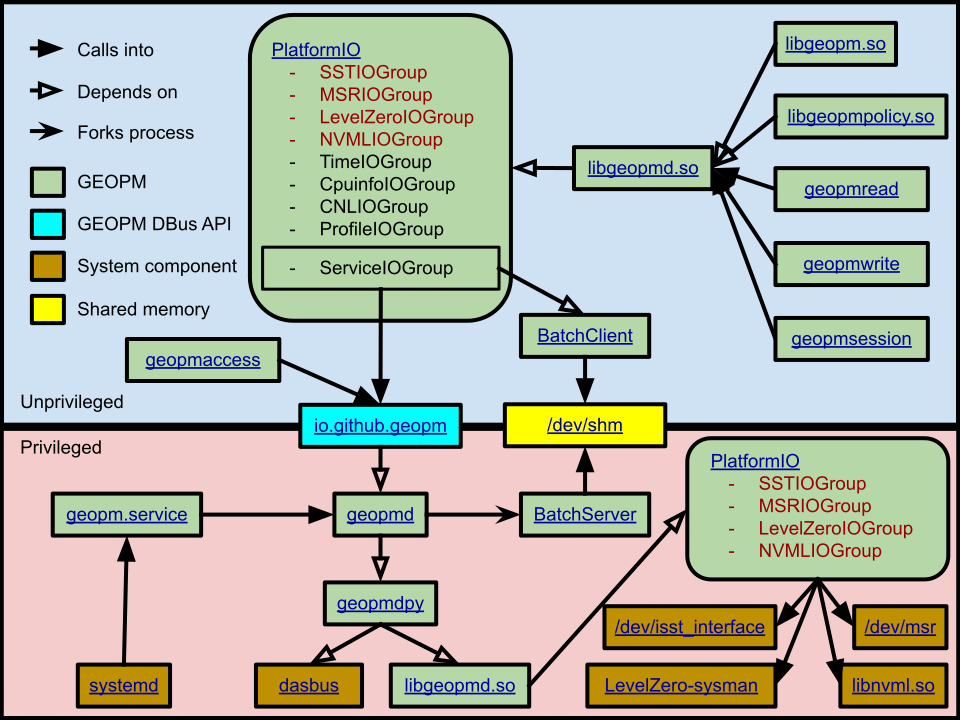
The geopmd daemon is started by the GEOPM systemd service and uses
D-Bus for communication with client processes and for administrator
configuration. The GEOPM service is used to extend the
geopm::PlatformIO features of libgeopm and libgeopmpolicy. The
PlatformIO interface of GEOPM is extensible through IOGroup plugins
and the GEOPM service enables the ServiceIOGroup. The ServiceIOGroup
is implemented to provide the requirements of the IOGroup class by
interfacing with geopmd over the D-Bus interface. The
ServiceIOGroup plugin is loaded first by PlatformIO in libgeopm and
libgeopmpolicy, and is not loaded by the PlatformIO implementation in
libgeopmd. For a libgeopm or libgeopmpolicy user, any IOGroup other
than the ServiceIOGroup that provides a requested signal or control
will be used. The ServiceIOGroup will only be used when a user
requests a signal or control that cannot be provided by any of the
native IOGroup plugins loaded by the unprivileged user process. The
geopmd process loads PlatformIO through libgeopmd as a root user which
has permissions to load all signals and controls from all IOGroups but
does not load the ProfileIOGroup that provides signals derived from
the user application. The PlatformIO loaded by geopmd provides the
implementation for the GEOPM service D-Bus interfaces.
Architecture Diagram
Status
The GEOPM systemd service is a new feature. What exists currently is a proof of concept / prototype, and there are many outstanding issues that must be resolved before the GEOPM service is ready for release. These issues are tracked on github with the “geopm-service” tag:
https://github.com/geopm/geopm/issues?q=is%3Aissue+is%3Aopen+label%3Ageopm-service
Signals and Controls
Each GEOPM signal and control has an associated name and a hardware
domain. The name is a unique string identifier defined by the IOGroup
that provides the signal or control. The hardware domain that
provides the interface is represented by one of the enumerations as
defined by PlatformTopo. A detailed description of the signals and
controls available on a system can be discovered with the
geopmaccess command line tool. The description includes information
useful for end-users, and it also provides information for system
administrators that will help them understand what is enabled for an
end-user when access is granted to a signal or control.
Access Management
Access to signals and controls through the GEOPM service is configured by the system administrator. The administrator controls a default access list that applies to all users of the system. This list can be augmented based on Unix group associations. The default lists are stored in:
/etc/geopm-service/0.DEFAULT_ACCESS/allowed_signals
/etc/geopm-service/0.DEFAULT_ACCESS/allowed_controls
Each Unix <GROUP> that has extended permissions can maintain one or
both of the files
/etc/geopm-service/<GROUP>/allowed_signals
/etc/geopm-service/<GROUP>/allowed_controls
Any missing files are inferred to be empty lists, including the
default access files. A signal or control will not be available to
non-root users through the GEOPM service until a system administrator
enables access through these allow lists. It is recommended that all
manipulation of these files should be done through the GEOPM service
with the geopmaccess command line tool.
Some filtering may be applied to the raw signals provided by the IOGroups before being exposed to the client session. In particular, all monotonic signals (e.g. hardware counters) are reported with respect to the value they had when they were first read in the session, which is reported as zero.
Opening a Session
A client process opens a session with the GEOPM service each time a PlatformIO object is created with libgeopm or libgeopmpolicy while the GEOPM systemd service is active. This session is initially opened in read-only mode. Calls into the D-Bus APIs that modify control values:
io.github.geopm.PlatformWriteControl
io.github.geopm.PlatformPushControl
convert the session into write mode. Only one write mode session is allowed at any time. The request will fail if a client attempts to begin a write session while another client has one open.
When a session is converted to write mode, all controls that the service is configured to support are recorded to a save directory in:
/var/run/geopm-service/SAVE_FILES
When a write mode session ends, all of these saved controls are restored to the value they had when the session was converted, regardless of whether or not they were adjusted during the session through the service.
The request to open a session is done in the ServiceIOGroup
constructor, and the request to close the session is made by the
ServiceIOGroup destructor. Calls to the ServiceIOGroup’s
write_control() or push_control() methods will trigger the
conversion of the session to write mode. Calls to these methods will
only occur when the ServiceIOGroup is the only loaded IOGroup that
provides the control requested by the user since all IOGroups are
loaded by the PlatformIO factory after the ServiceIOGroup.
Note that if any control adjustments are made during a session through the GEOPM service then every control supported by GEOPM will be reverted when the session ends. One consequence of this is that when a control is exposed to a user only through the GEOPM service, then the geopmwrite command line tool will not be effective (the value will be written, but reverted when the geopmwrite process ends). The geopmsession command line tool can be used to write any number of the GEOPM supported controls and keep a session open for a specified duration (or until the geopmsession process is killed).
In addition to saving the state of controls, the GEOPM service will
also lock access to controls for any other client until the
controlling session ends. When the controlling session ends the saved
state is used to restore the values for all controls supported by the
GEOPM service to the values they had prior to enabling the client to
modify a control. The controlling session may end by an explicit
D-Bus call by the client, or when the process that initiated the
client session ends. The GEOPM service will use the pidfd_open(2)
mechanism for notification of the end of the client process if this is
supported by the Linux kernel, otherwise it will poll procfs for the
process ID. The GEOPM service provides an interface that enables a
privileged user to end any currently running write mode session, and
block any access to controls by other clients. There is a
corresponding unlock interface that will enable write mode sessions to
begin again.
Batch Server
The GEOPM service provides the implementation for the ServiceIOGroup
which accesses this implementation through the DBus interface. When a
user program calls read_signal() or write_control() on a
PlatformIO object provided by libgeopm or libgeopmpolicy and the only
IOGroup that provides the signal or control requested is the
ServiceIOGroup, then each request goes through the slow D-Bus
interface. When a client process uses the ServiceIOGroup for batch
operations a separate batch server process is created through the D-Bus
interface. The implementations for push_signal() and
push_control() are used to configure the stack of signals and
controls that will be enabled by the batch server. This batch server
interacts more directly with the client process to provide low latency
support for the read_batch() and write_batch() interfaces of the
ServiceIOGroup.
The batch server is configured to allow access to exactly the signals
and controls that were pushed onto the stack for the ServiceIOGroup
prior to the first read_batch() or write_batch() call. Through
the D-Bus implementation, the GEOPM service verifies that the client
user has appropriate permissions for the requested signals and
controls. When the first call to read_batch() or write_batch() is
made to user’s PlatformIO object, the geopmd process forks the batch
server process and no more updates can be made to the configured
requests. The batch server uses inter-process shared memory and POSIX
signals to enable fast access to the configured stack of GEOPM signals
and controls. In this documentation we will call always refer to
“POSIX signals” to differentiate from the GEOPM signal concept which
is unrelated to the POSIX signal as defined in the signal(7) man page.
To implement the read_batch() method, the ServiceIOGroup sends a
POSIX signal to notify the batch server that it would like the
configured GEOPM signals to be updated in shared memory. The batch
server reads all GEOPM signals that are being supported by the
client’s ServiceIOGroup using the batch server’s instance of the
PlatformIO object. GEOPM signals are copied into the shared memory
buffer and a SIGCONT POSIX signal is sent from the batch server to the
client process when the buffer is ready. To implement the
write_batch() method, the client process’s ServiceIOGroup prepares
the shared memory buffer with all control settings that it is
supporting. The client sends a SIGCONT POSIX signal to the batch
server to notify it to write the settings. The batch server then
reads the clients settings from a shared memory buffer and writes the
values through the server process’s PlatformIO instance.